Convert JPG to Excel Free in Seconds

Accurately convert any image into a clean, editable Excel spreadsheet for free, without typing a single word.

Upload

Drop, Upload and Paste your file here to Extract Text from Image

Supported file types:   PNG | JPG | JPEG

Your privacy is protected! Your files are secure and never stored.

How Our JPG to Excel Converter Works?

Watch our tool convert images from upload to download in under 30 seconds, and learn the key points for achieving the best results.
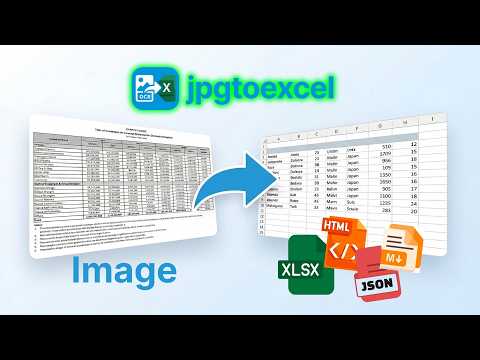
How Our JPG to Excel Converter Works

Convert JPG to Excel Online Instantly in 3 Steps

Upload

Upload Image

Drag and drop your images or browse files to upload. We support JPG, JPEG, PNG, PDF and various other formats for easy input.

Convert

Convert

Click “Convert” button. Our OCR engine detects your table structure, reconstructs every row and column, and processes the file in seconds.

Download

Download Excel

Download as .xlsx, HTML, or copy directly to your clipboard. Opens in Excel, Google Sheets, or any spreadsheet tool immediately.

Everything You Need in a JPG To Excel Converter?

Features

Benefits

High-Precision OCR

Achieves over 99% accuracy on clean images. Even low-quality scans are pre-processed to improve results before the OCR engine runs, rather than being passed through as-is.

Unlimited Free Conversions

Convert as many images as you need, whenever you need them. No paywalls, no hidden fees, and no daily limits.

Absolute Security & Privacy

Your privacy is our top priority. All uploaded files are protected by end-to-end encryption and are automatically and permanently deleted from our servers after conversion, ensuring your information is never exposed.

Intelligent Table Recognition

Equipped with a specialized AI-powered JPG to Excel Converter, this tool accurately recognizes complex tables while keeping your original rows, columns, and cell layouts strictly intact.

Extensive Language Support

Extract tables and text from images in over 100 languages, including widely-used languages like English, Spanish, and Chinese, as well as complex scripts like Japanese, Korean, and Arabic.

24/7 Customer Support

Have a question or need help with a conversion? Our dedicated support team is available around the clock to assist you.

OCR table recognition icon

Our image to Excel converter is a free tool that transforms images into spreadsheets with high precision. It uses intelligent Optical Character Recognition (OCR) technology specifically designed to recognize tables.

OCR table recognition icon

You can grab data from invoices, bank statements, inventory lists, or even screenshots of data tables. If you have a physical page full of numbers, just snap an image and let our tool handle the rest.

OCR table recognition icon

Most importantly, you can convert images to Excel online without worrying about the image’s format, whether it’s .JPG, .JPEG, .PNG, .BMP, or .TIFF.

Powerful Features of Our Image To Excel Converter

Table Recognition

Intelligent Table Recognition

Our advanced, AI-powered algorithms automatically detect and preserve complex table structures when you convert images to Excel. Rows, columns, merged cells, and formatting are maintained exactly as they appear in your image—no more messy outputs!

Multi-language

Multi-language & Multi-format Support

This versatile Image to Excel Converter online tool supports data extraction in over 100 languages (including Asian characters and special symbols) with high accuracy. Plus, enjoy support for a wide range of image formats, including JPG, JPEG, JPE, JFIF, BMP, PNG, TIFF, without worrying about compatibility.

Image Enhancement

Smart Image Enhancement

Automatic image processing adjusts brightness, contrast, and removes noise from low-quality scans or photos, delivering improved conversion accuracy even for difficult or unclear images.

Bulk Processing

Bulk Image Processing

Save time with batch processing by converting up to 100 images at once into spreadsheets with a single click. Effortlessly digitize large sets of images for productivity at scale

Cloud Integration

Seamless Cloud Integration

Import images from and export Excel files to popular cloud services like Google Drive, Dropbox, and OneDrive for seamless access anywhere. No software installation required—everything is cloud-based and accessible instantly.

Export Options

Flexible Export Formats

Choose from XLSX, CSV, or Google Spreadsheet formats when digitizing images to Excel. Easily customize column headers, data formatting, and sheet organization to match your workflow.

Export Options

Completely Free & Secure

Enjoy completely free conversions—no registration or payment needed. Your data is processed in a secure environment and permanently deleted from our servers after processing, ensuring your privacy and security at all times.

Export Options

Zero Manual Cleanup

Unlike basic OCR tools that leave you with jumbled text, we deliver clean, structured data. Your spreadsheet is ready to use the second you download it.

Who Benefits from Our JPG to Excel Converter?


See how different industries use our tool to automate their workflows and save hours every week.
Business

Operations Professionals

Operations and supply chain teams can use our JPG to XLS converter to quickly turn printed inventory lists, vendor catalogs, shipping logs, and warehouse paperwork into editable Excel spreadsheets. Reduce manual data entry, avoid errors, and keep logistics, stock tracking, and reporting workflows running smoothly.
Use cases:
  • Convert physical stock-taking sheets, warehouse logs, and inventory photos into Excel for real-time tracking.
  • Extract product tables, SKU lists, pricing data, and shipping details from printed vendor catalogs or manifests.
Business

Researchers

Data tables locked inside images, printed journals, or even PDFs cannot be sorted, filtered, or analyzed. Extract them into Excel to work with the numbers directly, merge datasets, run statistics, and build charts.
Use cases:
  • Extract tabular data from scientific papers, textbooks, or survey forms.
  • Collect and organize research results or experimental data without manual re-entry.
Business

Financial Professionals

Convert JPG to XLSX for invoices, financial statements, expense reports, and bookkeeping. Digitizing images streamlines workflows, improves accuracy, and simplifies integration with accounting software.
Use cases:
  • Import scanned bank statements or invoices into your financial tools.
  • Automate repetitive data entry for financial analysis and reporting.
Business

Administrators

Extract tables from images of student lists, employee records, or other scanned images. This tool helps structure and organize data for efficient sorting and filtering.
Use cases:
  • Convert printed attendance lists or administrative reports to Excel for editing.
  • Digitalize old images to update or analyze legacy data.
Business

Anyone Handling Image-Based Data

Whether you’re dealing with image to spreadsheet conversion for personal or professional projects, our free JPG to Excel converter saves valuable time with its easy, accurate, and fast OCR to Excel technology.
Use cases:
  • Quickly convert photos of hand-written notes, schedules, or printed tables into editable Excel files.
  • Make digital backups of important documents for future access and sharing.

Hear What Our Users Are Saying

Shaun Moore

As a business analyst, I often need to extract data from scanned images. This JPG to Excel converter has been a lifesaver! It’s incredibly accurate and fast, allowing me to quickly turn images into usable spreadsheets.

Shaun Moore

Business Analyst

James Lee

I had a lot of handwritten notes that I needed in Excel format for a project. This online JPG to Excel converter was so easy to use and the conversion was surprisingly accurate. Definitely recommend it!

James Lee

Researcher

Roberto Carlos

I love how simple it is to convert images of invoices and receipts to Excel with this tool. It saves me so much time compared to manually typing every number. The fact that it’s free for basic use is also a huge plus!

Roberto Carlos

Accountant

Scale Your Business with Our Ultimate Data Extraction Platform

Need high-volume conversions? Our enterprise-grade OCR API integrates seamlessly into your workflow,
turning thousands of images into structured Excel data.
Get your API key and start building today

Tips and Insights from Our Blog

Learn more about data extraction, productivity hacks, and how to get the most out of our tool.

Managing vehicle identification data at scale is one of the most persistent operational challenges in the automotive industry, and one of the most consequential when it goes wrong. Every car on the road has a unique 17-character vehicle identification number (VIN). For dealerships, insurance firms, and logistics providers, this number appears on title documents, registration […]

JPG to Excel Converter: The Best Online Tools to Turn Images into Actionable Data A JPG to Excel converter is a software tool that uses Optical Character Recognition (OCR) technology to scan an image file, detect text and table structures, and export the data into an editable .xlsx spreadsheet. The best converters process a standard table […]

Payroll document JPG to Excel conversion is now the foundational step in any serious HR automation strategy. According to the American Payroll Association, payroll errors cost businesses up to 1.2% of total payroll annually, a figure that compounds rapidly for any team still transcribing salary data by hand. Every month, HR teams across industries waste […]

Get Answers To Your Questions